Prompt for a winter AI photoshoot
Winter portraits in vertical format have become a new trend in AI photography. Snow-white landscapes, soft lighting, and gentle snowfall create an atmosphere of coziness and tranquility. Thanks to AI-powered tools like Gemini, you can easily create a realistic vertical portrait with a snowy background—no studio or photoshoot required.
Author - Mansur Ismagulov
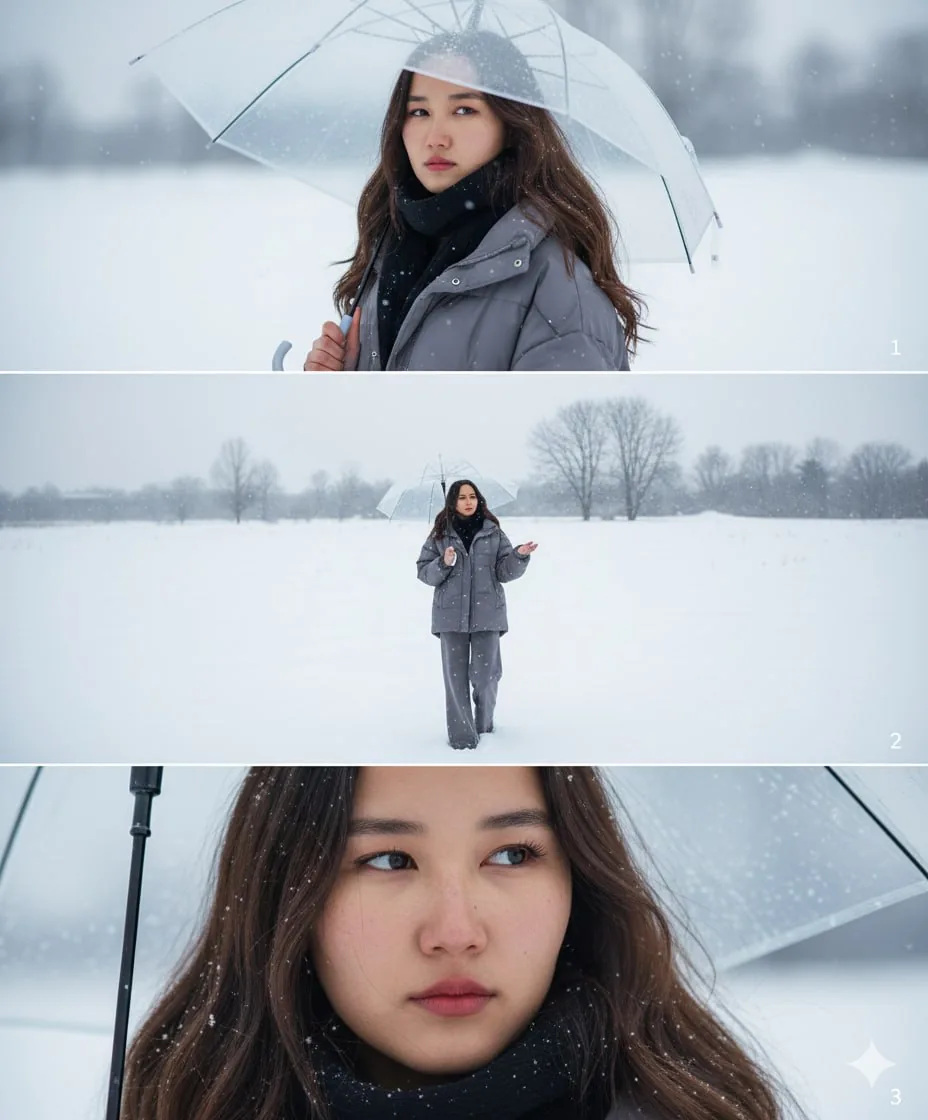
How to create a photo
- Open Gemini or another image generator.
- Insert your high-quality photograph along with the prompt below.
- If necessary, add a description of appearance, clothing, or scene details.
Prompt for a female portrait
Create a vertical frame size 2160x3840 pixels, 4K quality — divided into three equally sized horizontal images placed together. The main character is based on the reference face, hairstyle, and body: a young figure with an expression of sadness and nostalgia, deep eyes radiating loneliness. The outfit is a [ loose winter puffer set with wide-leg pants and a black scarf ]. The overall atmosphere is covered in white snow, with a cold color palette that evokes melancholy and solitude.
Image 1. Portrait: the character holds a [ transparent ] umbrella, turning their head slightly back while looking directly at the frame. The expression is sorrowful, with soulful eyes. The background is blurred with snowy whiteness.
Image 2. Full body: the character, with the umbrella, stands alone in a vast snowy field, walking while gazing at the sky. The camera angle looks downward from above, as if the character is raising a hand to catch falling snowflakes. In the distance, a few bare, leafless trees stand. The scene conveys smallness and isolation against the vastness of nature.
Image 3. Close-up: a zoomed-in shot of the character's eyes, with a distant, sorrowful gaze that evokes feelings of loneliness and yearning.
You can change the color of the clothing, the umbrella, or the lighting to create an individual mood for the frame.
Tips for refining the image
— use photo editors like CapCut, Lightroom, or Snapseed to adjust contrast and add soft background blur
— optionally add a slight film grain to simulate a film photograph.
The Tech on Telegram Follow The Tech on Telegram
Keep up with the latest technology and startup news.
Related reading







More from this author

News
zypl.ai begins operations in Japan and focuses on next-generation risk models
Mansur Ismagulov

News
Elon Musk's net worth has exceeded $700 billion for the first time
Mansur Ismagulov

Article Interviews
"Central Asian countries should build a joint ecosystem," — Bekhzod Ismoilov on the development of AI in the region
Mansur Ismagulov

Article Interviews
Bloom's Taxonomy and Engineering Levels: A Practical Growth Model
Mansur Ismagulov

Article Useful
How the IT industry in Azerbaijan developed in 2025: key events
Mansur Ismagulov

News
Tajikistan has become a new member of the regional innovation alliance Central Asian Innovation Hubs.
Mansur Ismagulov