Using ChatGPT for Writing Code: A Guide for Developers
Author - Mansur Ismagulov
The Tech AI
Get the key points in seconds - a short summary from The Tech AI.
ChatGPT optimizes code writing by automating routine tasks and assisting with debugging. The usage process includes eight steps: precisely defining the task (language, functionality), creating detailed prompts, critically evaluating and testing the generated code, refactoring it, and documenting it. The tool boosts productivity but does not replace the developer's problem-solving skills.
ChatGPT is a tool that helps developers of all levels optimize code writing, stimulate creativity, and increase productivity. It does not replace programmers but automates repetitive tasks, such as data processing or creating basic functions, allowing you to focus on logic and problem-solving.
ChatGPT assists with code completion, idea generation, explaining functionality, and debugging by identifying syntax errors or logical inconsistencies.
How to use ChatGPT for writing code:
Step 1: Clearly define the task
Before working with ChatGPT, carefully plan what you want to achieve with the code. Do not limit yourself to vague ideas; specify them. Here is what you should consider:
— programming language: which programming language will you use? Specifying the language will help ChatGPT tailor its responses to the correct syntax and libraries
— functionality: what specific problem are you trying to solve with this code? Clearly explain how the code should work. Examples include creating a user registration form, sorting an array of numbers, or implementing a machine learning algorithm
— inputs and outputs: what data will the code receive as input? Conversely, what will the code output?
— constraints: are there any limitations or special requirements that the code must adhere to? For example, memory usage constraints may apply; consider performance issues when writing code, and ensure compatibility with certain libraries.
Step 2: Enter the task as a clear and detailed prompt
Compose a prompt for ChatGPT, but be as specific as possible. Here are some tips:
— start with a clear instruction: give ChatGPT the task you want to perform. For example, say: “Write a Python function that takes a list of numbers and returns the sum of all even numbers in it”
— provide context for these instructions: if your code involves using specific libraries or frameworks, clearly specify them in the prompt. You can provide relevant code snippets that you already have as a starting point for ChatGPT
— use examples: if applicable, provide examples of input data and expected results to guide ChatGPT toward the desired solution.
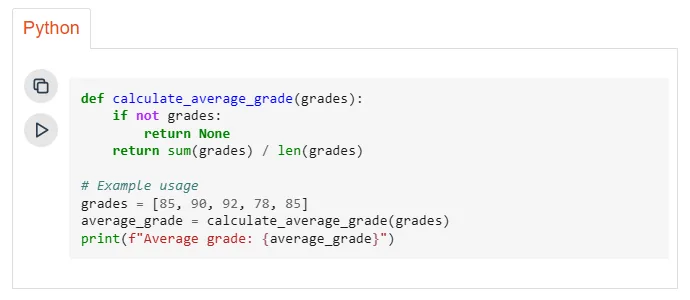
Prompt example
Write a Python function called calculate_average_grade that takes a list of student grades as input, integers from 0 to 100. The function should calculate the average grade and return it as a floating-point number. If the list is empty, the function should return None.
Generated result
Step 3: Critically evaluate the generated code
ChatGPT may not immediately generate perfect code. Carefully review the output, looking for:
— functionality: does the code correctly perform the assigned task? Test it with different inputs to ensure it produces expected results
— syntax errors: are there any syntax errors or typos that prevent the code from executing?
— logical errors: does the code contain any logical errors that lead to incorrect behavior?
— readability: is the code well-formatted, easy to understand, and properly commented?
Step 4: Refine the request based on the initial result
ChatGPT’s first attempt may not be perfect, but that’s okay. Here’s how you can improve it:
— identify areas for improvement: point out specific aspects of the code that need changes after reviewing it
— refine prompts: adjust your prompts to guide ChatGPT in the right direction based on the initial results. Be as specific as possible about what you want to change.
Several examples:
— if the code does not work in edge cases, specify such situations in the prompt and ask ChatGPT to adjust the code accordingly
— if the code is functionally correct but difficult to understand, ask ChatGPT to refactor it to improve readability by adhering to widely accepted coding conventions
— if a preferred algorithm is specified in the code, mention it in the request and ask ChatGPT to create code that implements this algorithm.
Step 5: Thoroughly test the generated code
Do not rely solely on ChatGPT’s results. Write unit tests to check the code’s functionality under different input scenarios. Manually test the code with various inputs. Look for unexpected behavior, errors, or inefficiencies.
Step 6: Understand the generated code
Although ChatGPT can generate code, it is important to understand the underlying logic. Take time to analyze the code and understand how it works. This will help you:
— identify potential issues: understanding the logic allows you to spot potential problems in the code’s design or implementation
— make future changes: later, you may need to modify the logic when updating your algorithm
— integrate effectively: when integrating the generated code into your larger project, understanding its functionality is crucial for seamless integration.
Step 7: Refactor the code
If the generated code is functional but not optimal, consider refactoring it to improve:
— readability: better code readability can be achieved by using meaningful variable names, proper indentation, and comments to explain complex logic
— maintainability: ensure that best coding practices are followed, avoiding overly complex structures, which makes it easier to understand and adjust the code in the future
— efficiency: if performance is critical, consider all potential bottlenecks in the program and optimize speed or memory usage as needed.
Step 8: Clearly document the code
Comprehensively document the code, even if it was generated in ChatGPT. This documentation serves several purposes:
— understanding the purpose
— breaking down functionality: describe the different functions or modules in the code and their roles
— assumptions made: if the code relies on specific assumptions or external libraries, clearly describe them
— future reference: this documentation will help you and other developers understand the purpose and functionality of the code in the future.
Conclusion
ChatGPT is an important tool in your coder’s toolkit, and to use ChatGPT for writing code, you need to know its advantages and disadvantages, create good prompts, and follow best practices to leverage it for accelerating development, stimulating creativity, and increasing programming productivity. However, remember that ChatGPT will not replace your problem-solving skills and critical thinking abilities. Therefore, by experimenting with ChatGPT, you can unlock your full potential.
Read the full article here.
The Tech on Telegram Follow The Tech on Telegram
Keep up with the latest technology and startup news.
Related reading







More from this author

News
zypl.ai begins operations in Japan and focuses on next-generation risk models
Mansur Ismagulov

News
Elon Musk's net worth has exceeded $700 billion for the first time
Mansur Ismagulov

Article Interviews
"Central Asian countries should build a joint ecosystem," — Bekhzod Ismoilov on the development of AI in the region
Mansur Ismagulov

Article Interviews
Bloom's Taxonomy and Engineering Levels: A Practical Growth Model
Mansur Ismagulov

Article Useful
How the IT industry in Azerbaijan developed in 2025: key events
Mansur Ismagulov

News
Tajikistan has become a new member of the regional innovation alliance Central Asian Innovation Hubs
Mansur Ismagulov