What's new in iOS 26: from Liquid Glass to Call Screening and the Games app
On September 15, 2025, Apple introduced iOS 26 — the most significant system update in recent years. It brings a new visual language called Liquid Glass, enhanced Apple Intelligence capabilities, and a host of improvements that make using the iPhone more personalized.
Author - Mansur Ismagulov
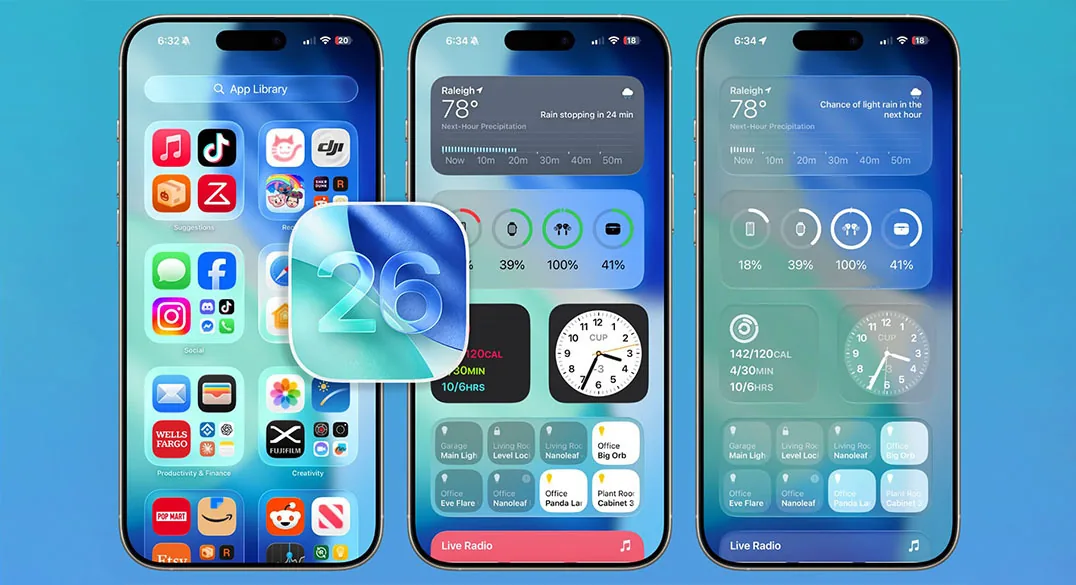
New Design
The main visual change is Liquid Glass. This is a new system style that adds depth and transparency effects. Icons have become "glassy," control elements dynamically refract the background, and the lock screen adapts the time and notifications to the wallpaper, keeping the focus on the main content.
In iOS 26, not only the home screen and Control Center have been updated, but also system apps — now the interface is more consistent across iPhone, iPad, and Mac.
Apple Intelligence and Visual Intelligence
Apple Intelligence is now more deeply integrated into the system:
— Visual Intelligence analyzes the screen and allows you to quickly search for information, add events to the calendar, or get contextual answers
— Live Translation translates calls, messages, and video calls in real time. With AirPods, the translation is spoken aloud — convenient for travel and negotiations
— Image Playground and Genmoji allow you to create personalized images and emojis based on descriptions
— in Shortcuts, intelligent actions have appeared — now the system can summarize text, generate images, and insert results directly into workflows.
Communication without noise
Apple continues its course to reduce digital stress:
— Call Screening automatically answers calls from unknown callers, clarifying their name and purpose of the call — the call reaches you only if you want it to
— in Messages and Phone, there is a filter for unknown senders, and the Hold Assist function automatically "holds the line" and notifies you when the operator is ready to respond
— messages have become more fun: you can create polls in group chats and set backgrounds for dialogues.
New features for discovery and entertainment
— Maps now remembers your favorite routes and warns about traffic jams before you leave home
— Games app brings your games together in one place, shows what your friends are playing, and provides personalized recommendations.
Small but important details
— Adaptive Power saves battery by intelligently reducing system load
— Photos has received a redesigned interface with two main tabs: Library and Collections
— CarPlay supports Live Activities and Tapbacks — now you can stay connected even while driving
— Accessibility has become richer: Braille Access has appeared, new options for reducing motion sickness, and flexible reading settings
— in Clock, you can set your own "sleep" duration — from 1 to 15 minutes.
Compatibility
iOS 26 is available for iPhone 11 and newer, including iPhone SE second generation and above. Some features, such as Live Translation and Apple Intelligence, require the latest models or may not work in all countries.
Depending on the specific smartphone model, iOS 26 can weigh up to 17 GB.
Is it worth updating
iOS 26 is a step forward that makes the iPhone more personal, smarter, and visually fresher.
If the device is compatible, the update will almost certainly please — especially if you want to try Live Translation or the new glass interface.
For those who prefer stability, it makes sense to wait for a couple of minor patches so that Apple can fix the first bugs. But already now, iOS 26 looks like one of the most significant updates since iOS 14.
The Tech on Telegram Follow The Tech on Telegram
Keep up with the latest technology and startup news.
Related reading




More from this author

News
zypl.ai begins operations in Japan and focuses on next-generation risk models
Mansur Ismagulov

News
Elon Musk's net worth has exceeded $700 billion for the first time
Mansur Ismagulov

Article Interviews
"Central Asian countries should build a joint ecosystem," — Bekhzod Ismoilov on the development of AI in the region
Mansur Ismagulov

Article Interviews
Bloom's Taxonomy and Engineering Levels: A Practical Growth Model
Mansur Ismagulov

Article Useful
How the IT industry in Azerbaijan developed in 2025: key events
Mansur Ismagulov

News
Tajikistan has become a new member of the regional innovation alliance Central Asian Innovation Hubs.
Mansur Ismagulov