Adobe MAX 2025: What's New in Photoshop, Premiere, and Firefly
At the Adobe MAX 2025 conference, the company unveiled updated versions of its creative tools — featuring deep integration of artificial intelligence. New features allow users to generate images and videos from text descriptions, enhance frames with a single click, and automate routine tasks. This overview highlights the key features already available to Creative Cloud 2025 users.
Author - Mansur Ismagulov
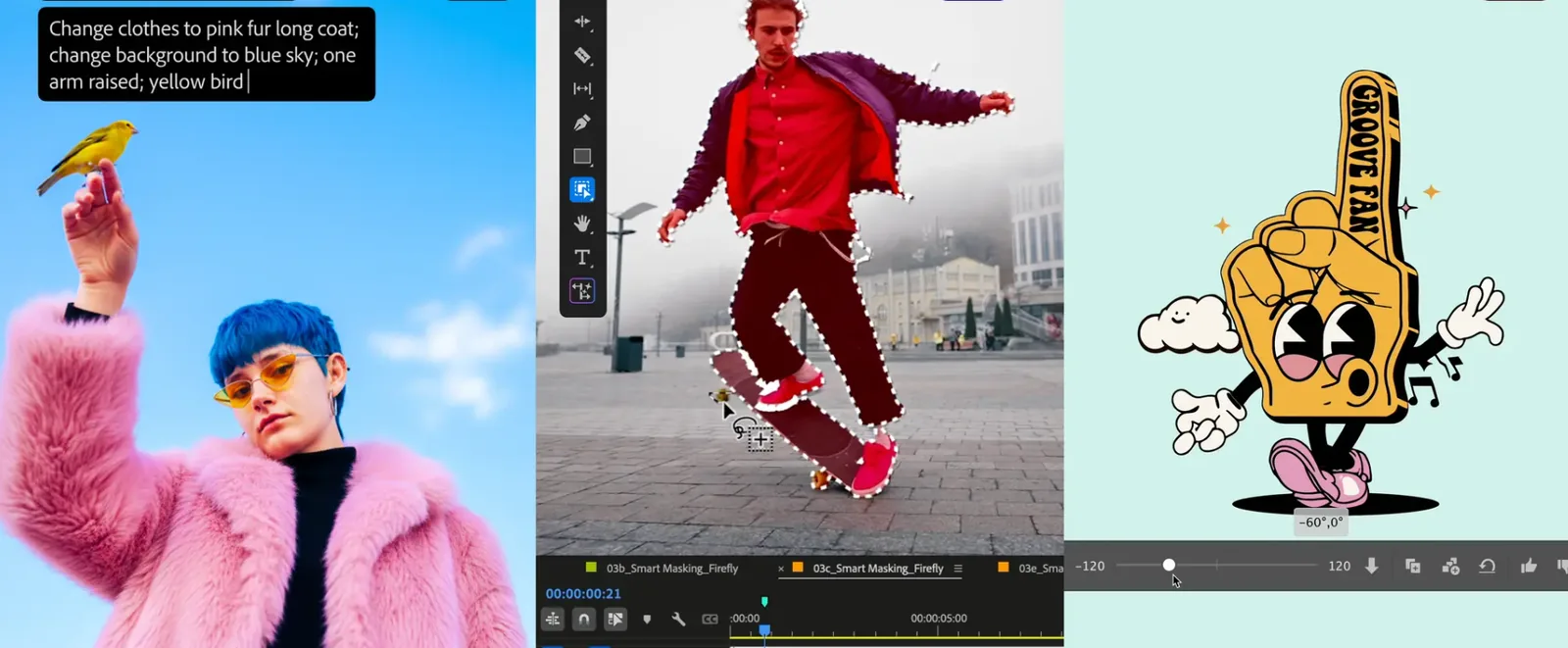
Adobe Photoshop 2025
Generative Fill 2.0
The "Generative Fill" feature now works faster and more accurately. You can insert or remove objects, expand the frame, and even change the weather—simply describe the desired result in words. Photoshop now supports the selection of generation models: its own Firefly 5 or partner models, such as Google Gemini 2.5 Flash Image and FLUX.1 Kontext.
Harmonize
A tool that helps "integrate" inserted objects into the scene. Photoshop automatically adjusts lighting, shadows, and color temperature so that the insertion looks natural. Useful for collages and advertising visuals.
Generative Upscale
AI upscaling increases image resolution without loss of quality. The technology enhances detail, removes noise, and adds realistic textures—especially useful when working with mobile photos or archival footage.
AI Assistant
Built-in voice and text assistant in Photoshop. You can type or say: "make the background blurry"—and the assistant will perform a series of actions automatically. It works with commands like remove background, enhance lighting, add depth.
Non-destructive Adjustments
New adjustment layers for color, temperature, saturation, and exposure. All changes are now fully reversible and do not damage the original file, which is convenient for team collaboration and project reviews.
Adobe Premiere Pro 2025
AI Object Mask
Premiere automatically recognizes people, objects, and backgrounds in video. You can apply color correction only to the face or clothing without creating manual masks. This speeds up editing and makes post-processing more precise.
Audio Enhance 2.0
Updated noise reduction and volume leveling system. AI automatically identifies problematic sounds, separates voice from background, and makes the audio sound "studio-quality" without plugins.
Auto Storyboard
A feature for automatically creating storyboards. Premiere analyzes the video, divides it into meaningful scenes, and suggests preliminary editing. Useful for short formats—Reels, TikTok, student videos.
Adobe Lightroom 2025
Assisted Culling
An AI system that helps select the best shots from a series. Lightroom evaluates sharpness, lighting, facial expression, and composition, keeping only the most successful photos.
Adaptive Presets 2.0
Presets that automatically adjust to the lighting and color of the scene. For example, the same filter works differently for a daytime and evening shot without manual adjustments.
Adobe Firefly 2025
Firefly Image Model 5
A new generation of generative model that creates images with higher detail and photorealism. Supports multi-layer generation—background, object, lighting, all separately.
Firefly Boards
A collaborative board for visual ideas. Allows teams to collect references, generate images, and discuss concepts together. Useful for media projects and visual storytelling.
Text-to-Audio
A new voiceover feature: Firefly can generate an audio track based on text or the mood of the scene. This simplifies the creation of short videos and storytelling without involving a voice actor.
The Tech on Telegram Follow The Tech on Telegram
Keep up with the latest technology and startup news.
Related reading







More from this author

News
zypl.ai begins operations in Japan and focuses on next-generation risk models
Mansur Ismagulov

News
Elon Musk's net worth has exceeded $700 billion for the first time
Mansur Ismagulov

Article Interviews
"Central Asian countries should build a joint ecosystem," — Bekhzod Ismoilov on the development of AI in the region
Mansur Ismagulov

Article Interviews
Bloom's Taxonomy and Engineering Levels: A Practical Growth Model
Mansur Ismagulov

Article Useful
How the IT industry in Azerbaijan developed in 2025: key events
Mansur Ismagulov

News
Tajikistan has become a new member of the regional innovation alliance Central Asian Innovation Hubs.
Mansur Ismagulov