15 Apple updates in 2025 you should know about
On June 9, 2025, the annual WWDC conference took place, during which Apple announced significant changes to its ecosystem. We have prepared a comprehensive overview of what the company presented; read the article.
Author - Mansur Ismagulov
The Tech AI
Get the key points in seconds - a short summary from The Tech AI.
Apple is switching to annual operating system numbering: iOS 26, macOS 26, and other versions will receive a year-based index. The systems are introducing the Liquid Glass design, updating the Safari, Camera, Phone, and Photos apps, and adding a separate Apple Games app. Key new features include AI capabilities in Messages and Spotlight, direct translation during calls, support for PSVR2 controllers in Vision Pro, and enhanced HomeOS capabilities.
Transition to annual operating system numbering
Apple is moving away from the traditional iOS 18 or macOS 13 versioning system and adopting annual branding. All operating systems will now receive numbers corresponding to their release year: iOS 26, macOS 26, iPadOS 26, watchOS 26, tvOS 26, and visionOS 26. Developers already have access to beta versions, with a public release expected in the fall.
Updated Liquid Glass design
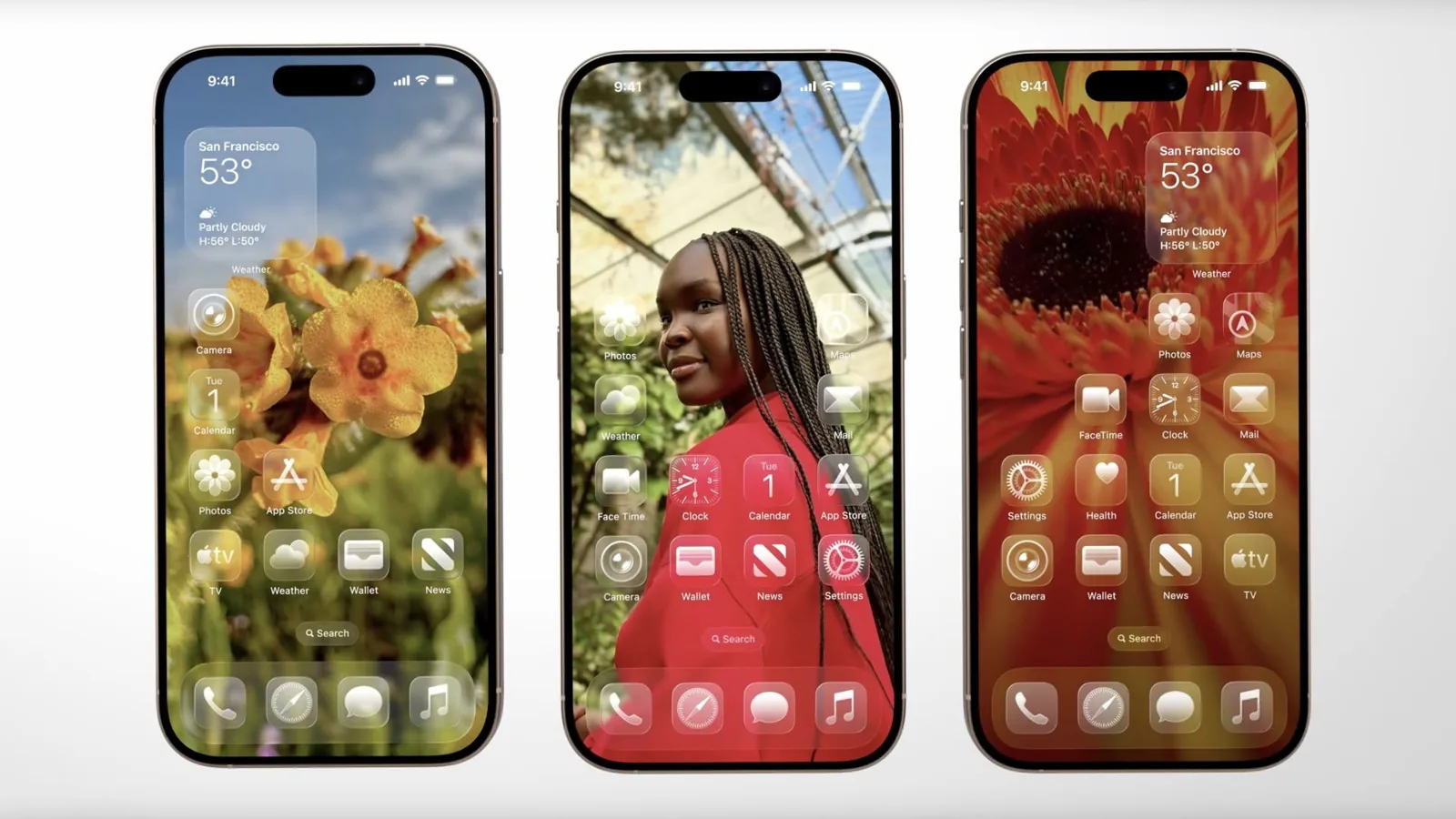
All Apple systems will feature a new visual style called Liquid Glass. The interface will become more transparent: controls, text, sliders, and buttons will appear to "float" on the screen. The clock and notifications on the iPhone lock screen will become semi-transparent, allowing the wallpaper behind them to be visible. The new style is inspired by the aesthetics of VisionOS and offers a lighter, more airy interaction.
Updates to Safari, Camera, Phone, and Photos apps
Safari now displays websites in full screen, minimizing the interface. The Camera app has simplified navigation between modes: photo and video are immediately accessible, while other modes are reached by swiping across the panel. In the Phone app, the "Favorites," "Recents," and "Voicemail" tabs have been merged into a single feed, and the call, contacts, and keyboard buttons are positioned at the bottom of the screen for convenience. The Photos app has introduced a new Memories section, and Apple's AI automatically groups photos by events, people, and locations.
New Apple Games app
Apple has introduced a dedicated games app, Apple Games. It consolidates all downloaded games and Apple Arcade subscriptions. The Library tab allows users to view installed games, and the Play Together feature enables inviting friends to play together.
Personalization in Messages and new group chat features
In iOS 26, the Messages app allows users to set individual backgrounds for chats, conduct polls in groups, see typing indicators for all participants, and filter messages from unknown senders into a separate folder to keep the main conversation clean.
Apple Intelligence and screen search
The new Apple Intelligence tool allows users to invoke the AI assistant using the same buttons used for taking screenshots. Users can ask questions about screen content, use ChatGPT for clarifications, and search for similar images or products on Google and Etsy.
Direct translation in calls, texts, and FaceTime
The Live Translation feature automatically translates text in messages, voices translated speech during phone calls, and displays subtitles during FaceTime video calls.
PSVR2 controller support in Apple Vision Pro
Vision Pro now supports PlayStation VR2 controllers, expanding the selection of games and improving control in virtual reality. Navigation using upward or downward gaze has been added, along with spatial widgets that appear automatically at the right moment.
Spotlight in macOS Tahoe becomes smarter
The updated Spotlight search is now personalized and more relevant: the system suggests filters to help users quickly find the desired files, apps, and messages. Spotlight now allows performing actions directly from search results—for example, sending an email or creating a note. macOS 26 also includes the Phone and Games apps, and Live Activities from iPhone are now available on the Mac.
Camera control via AirPods and improved voice recording
With AirPods, users can now take a photo by simply tapping the stem of the earbud. A new feature allows recording studio-quality voice even in noisy environments, thanks to an advanced noise cancellation system. Updates are supported on AirPods Pro 2, as well as the new AirPods 4 and AirPods 4 with Active Noise Cancellation.
Enhanced Apple Maps and Wallet features
Apple Maps now suggests routes based on user habits, calendar events, and weather conditions. The Wallet app now supports digital versions of hotel keys, insurance cards, and travel documents. The AI assistant will suggest which pass might be useful in a specific location or at a specific moment—for example, before boarding a flight.
New Apple Notes features with markdown support
The Notes app now supports markdown formatting: headings, bold text, lists, code blocks, and quote highlighting. Users can create collapsible sections, organize notes, and automatically generate concise summaries of notes using AI.
Improved window management in iPadOS 26
iPadOS 26 brings macOS-like flexible window management. Users can now resize windows, move them freely across the screen, and open multiple windows simultaneously. A new menu bar provides access to additional commands. A more precise cursor and support for the Preview app, familiar to Mac users, have also been added.
HomeOS
HomeOS was not presented on stage; a series of patents filed through a shell company indicates the development of a new operating system for the smart home. It may unify HomeKit, Apple TV, and other devices into a single platform. This is currently just preparation, but the direction is clear: Apple is betting on expanding its home ecosystem.
PSVR2 controller support in Vision Pro
visionOS 26 brings support for PlayStation VR2 Sense controllers, giving users access to a wider range of VR games. Additionally, gaze-based scrolling has been implemented—users can now flip pages simply by moving their eyes up or down. Widgets have received spatial styling and automatically return to their familiar position each time Vision Pro is used.
The Tech on Telegram Follow The Tech on Telegram
Keep up with the latest technology and startup news.
Related reading







More from this author

News
zypl.ai begins operations in Japan and focuses on next-generation risk models
Mansur Ismagulov

News
Elon Musk's net worth has exceeded $700 billion for the first time
Mansur Ismagulov

Article Interviews
"Central Asian countries should build a joint ecosystem," — Bekhzod Ismoilov on the development of AI in the region
Mansur Ismagulov

Article Interviews
Bloom's Taxonomy and Engineering Levels: A Practical Growth Model
Mansur Ismagulov

Article Useful
How the IT industry in Azerbaijan developed in 2025: key events
Mansur Ismagulov

News
Tajikistan has become a new member of the regional innovation alliance Central Asian Innovation Hubs.
Mansur Ismagulov