iMac or Mac mini: which desktop Mac to choose
If you've decided to buy an Apple desktop computer, you need to choose between two options: iMac or Mac mini. At first glance, they look similar — both run macOS, support modern Apple Silicon processors, and are suitable for work, creativity, and everyday tasks. But their concepts are completely different.

Let’s figure out the differences between the iMac and Mac mini, who each is suitable for, and what to pay attention to.
iMac: nothing complicated — just plug it in
The main idea behind the iMac is to spare you from unnecessary decisions: a computer, display, speakers, camera, and microphones are all combined into one chassis. So after purchase, you only need to connect the power and start working.
This approach will be especially appreciated by those who do not want to deal with device compatibility or spend time selecting a monitor. The workspace looks neat, takes up minimal space, and is not cluttered with wires.
Not only does the iMac look stylish and fit organically into almost any space, but it also offers serious technical capabilities. Thanks to Apple Silicon processors, the computer quickly handles everyday tasks, multitasking, and resource-intensive applications — from photo editing to video editing.
Another plus of the iMac is the bright Retina display with high detail. It is equally pleasant to work with texts, photos, and videos on it, and the clear image makes long hours at the computer more comfortable.
You won’t have to worry about security either. macOS already includes built-in protection mechanisms and regular updates, so you can simply start using the computer without spending time on additional settings.
If you are switching to macOS for the first time, maintaining your familiar workflow will also be easy. Just install Microsoft Office — and you will be able to work with familiar documents, spreadsheets, and presentations, taking advantage of all the benefits of macOS’s built-in security system.
If you are looking for a computer that will look equally good at home or in the office and will not require additional purchases, the iMac is a logical choice.
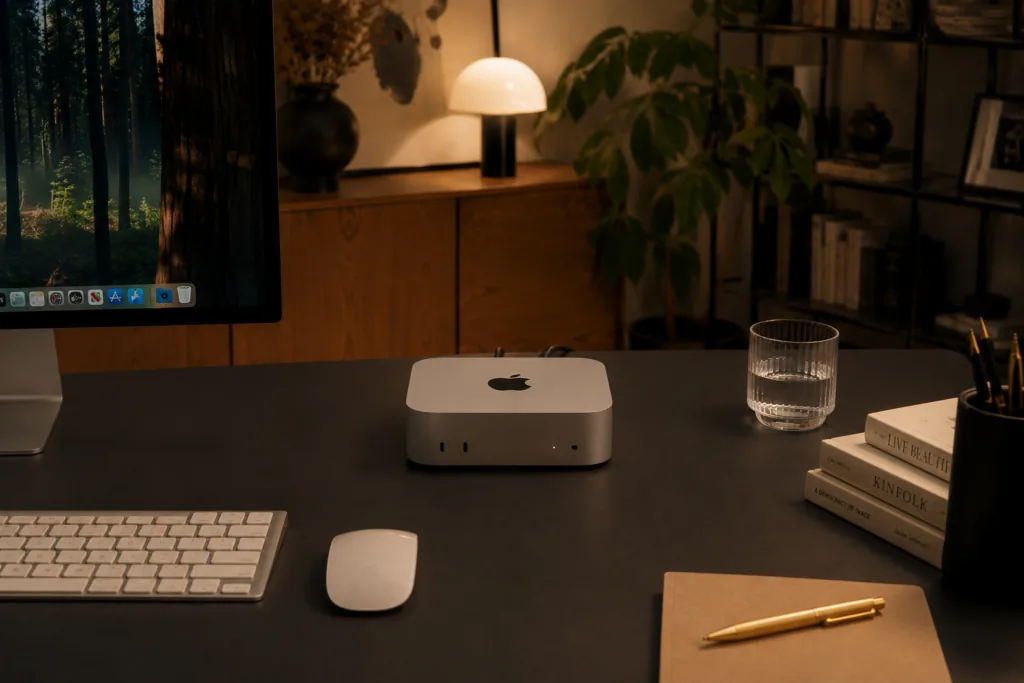
Mac mini: maximum freedom of choice
The Mac mini is built on a different philosophy. It surprises with its size — it is not a conventional system unit, but a compact computer that easily fits in the palm of your hand and takes up very little space on the desk.
If desired, it can be installed under the monitor, put on a shelf, or even mounted behind the display using a special mount, keeping the workspace almost free.
However, the Mac mini is just the computer itself. The user independently chooses the monitor, keyboard, and mouse, so the workspace can be assembled exactly as you prefer. If you already have a quality monitor and favorite accessories, you won’t need to buy them again.
Moreover, the Mac mini easily fits into almost any configuration. It can be connected to one or multiple monitors, used at home, in the office, or even as a compact workstation that takes up almost no space on the desk.
The level of security remains just as high: macOS regularly receives updates and already includes built-in protection mechanisms, so the computer is ready to work immediately after setup. There is no need to think about buying antivirus software and additional subscriptions — everything necessary for comfortable and secure work is already provided by the system.
This computer is often chosen by developers, designers, and anyone who prefers to independently determine what their workspace should look like.
What distinguishes the iMac from the Mac mini
Despite the fact that both computers run macOS and use modern Apple Silicon processors, the differences between them are not limited to appearance.
The iMac is a complete ecosystem. You get everything needed for work in one box, so additional costs after purchase are usually not required.
The Mac mini, on the contrary, implies a more individual approach, where the workspace can be assembled by yourself and upgraded later. For example, you can replace the monitor with a larger one or connect multiple displays without changing the computer itself.
Which desktop Mac to choose
Choosing between the iMac and Mac mini should be based on how you plan to use the computer.
If you need a computer that is ready to work right out of the box, the iMac is the best option. This is a solution for those who value simplicity, order, and do not want to think about selecting components.
The Mac mini will appeal more to users who love flexibility. It allows you to independently choose a monitor, assemble a workspace for your tasks, and gradually update individual elements of the system if necessary, without buying a new computer entirely.
There is also another point that often becomes decisive. If you are switching to macOS for the first time and want the simplest possible experience with Apple technology, it is better to choose the iMac. And to maintain your familiar work environment, you can install Microsoft Office and continue working with familiar files and applications with almost no changes.
If you have been using Apple computers for a long time or are used to independently selecting equipment for your tasks — the Mac mini is more suitable for you.
At the same time, regardless of the chosen model, you get all the benefits of the Apple ecosystem. If you already have an iPhone, iPad, or other Apple devices, they work together easily: you can take FaceTime calls directly on the computer, continue working with documents on different devices, quickly exchange files via AirDrop, and synchronize data via iCloud. This integration makes everyday work even more convenient.
Ultimately, both computers offer high performance, security, and reliability. The difference is only in which approach to work suits you better: a ready-made “all-in-one” solution or maximum freedom of choice.
Undoubtedly, this is one of those cases where it is better to see it once — and you can do this in the stores iSpace — an Apple mono-brand store, and at authorized partners: Sulpak, Mechta, Technodom, Evrika, Freedom Mobile. Experienced consultants will help you make the right decision.
The Tech on Telegram Follow The Tech on Telegram
Keep up with the latest technology and startup news.
Related reading




More from this author

Article Useful
How to protect your accounts from hacking: 8 settings you should check today
The Tech

Article Useful
500 Global: How the Accelerator Works and Who Can Receive Investments
The Tech

Article Interviews
Game Development in Central Asia: Arkady Moldavski on Developing Reverb and the Growth of the Industry
The Tech

Article Useful
Google, Tesla, BlackRock, and the IMF: Where to Apply for an Internship in Fall 2026
The Tech

News IT
Tesla unveiled the flying electric car Roadster
The Tech

News IT
Intero Biosystems startup won the Startup Battlefield at TechCrunch Disrupt 2026
The Tech