# Step-by-step guide: how to create and remember a complex password
*In the era of digital technologies, security on the internet is becoming increasingly important, and one of the first steps to enhance it is creating and remembering complex passwords. In this article, we will explain how to easily create a strong password and remember it.*
**Why a complex password is important**
A complex password is not just a combination of letters and numbers; it is your defender against hacking. It serves as the first barrier against unauthorized access to your accounts, personal data, and money. The more complex the password, the harder it is to guess or crack using automated programs.
**How to create a complex password**
— use long passwords. The ideal password length is at least 12 characters
— the password should include elements of letters, numbers, and special characters
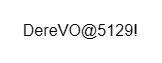 — do not use personal information
— use random words, but in the form of phrases
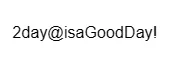 — use a password generator.
**How to remember complex passwords**
— use a password manager. This is a program that stores your passwords in encrypted form, and you can use it to automatically enter passwords on different websites
— create associations
— use the "first letters" method.
